



The Origin Story
For a while, I've been working with an event company, A&N Online Marketing, and we've always had to deal with ticketing services, running multiple gateways through different companies to handle ticketing. At a time, I was actually hired on the side to work for Glam Hospitality, a young nightlife promoter, to help them with their 18 and over events as far as scanning tickets and to get them inside. Due to my past experience with nightlife as a promoter and a designer in my youth, I decided why not do this for nostalgia and fun.
So I would end up working and actually seeing how the ticketing technology had changed over the years. Specifically, how they would bring their own digital tickets to be scanned. I would end up using different applications like Posh.vip and Markit, and while using them thought, "Hey, what if I could build something like this?"
Before, this wasn't a question because it was harder to do because of my lack of certain technical skills. But through the advent now of AI, I said, "Maybe this is a possibility." So I ended up playing with ChatGPT and put together a simple React Native ticket scanning MVP. Showed this MVP to the young promoter, and he was saying, "Oh, this is even better than what we use."
The Spark
That validation moment was the catalyst. Here I was, seeing firsthand the pain points in existing ticketing platforms - the complexity, the bloated interfaces, the friction in both setup and user experience - and realizing that with AI assistance, I could actually build something better.
Then I started playing with some OCR and some AI tools to try to create some sort of flyer extraction setup. At this time, I then moved on to using Claude for my coding. Playing with Expo Go at first for testing the app on my phone. So then I decided, why don't I actually start building a ticketing application? Now it seems with AI, this could be a thing to do.
OCR prototype showing flyer information extraction.
Summary
TokTix is a solo build that went from an idea to a live, in-market product. It ships as native iOS and Android apps and runs an active pilot with a real event company. I designed and built every piece of it, with AI-assisted development speeding up the work. Real-time analytics, in-app refunds, multi-organization workspaces, and role-based access have all shipped to production, growing TokTix from a ticketing MVP into full event operations infrastructure. Chargeback dispute protection is the current build.
- Technical Scope: React Native mobile app, Next.js web platform, and a Firebase backend with real-time features, Stripe Connect payments, AI flyer extraction through Gemini and Genkit, Telnyx SMS marketing, Apple and Google Wallet passes, and an automated end-to-end test suite
- Current Status: Beta launched August 2025; now live as native iOS and Android apps in an active pilot with a real event company. Analytics, refunds, organizations, and company/event-based roles are shipped; chargeback dispute protection is in development
- Architecture Design: Cross-platform service architecture with clean separation of concerns preventing typical solo project technical debt
- UX Philosophy: "Sleek and simple" design approach prioritizing core user flows over feature bloat, competing with established platforms like Posh, Luma, and Dice
- Solo Development: Everything from market research and technical architecture to mobile, web, and deployment infrastructure
- Modern AI-Assisted Workflow: Claude Code, Claude Projects, and AI coding assistants to speed up development without letting code quality slip
The Challenge
The project targets the nightlife event management market, where existing platforms like Posh, Luma, and Dice have adopted feature-heavy approaches that often overwhelm users. My goal was to prove that a single developer could architect and build a competitive platform by keeping the product simple and the engineering solid, with AI development tools making the solo build possible.
Building a production-ready ticketing platform as a solo developer presents unique challenges that stretch across multiple domains of expertise:
Technical Architecture Complexity
The platform has to tie together mobile and web experiences, real-time data sync, secure payments, and offline ticket scanning. Keeping all of that working without letting code quality or security slip takes real architectural planning.
UX Design Philosophy
Competing platforms suffer from feature bloat that complicates core user flows. The challenge was designing an interface that maintains simplicity while supporting complex behind-the-scenes functionality like multi-tier ticket management, event publishing workflows, and cross-platform authentication.
Solution
My approach came down to technology choices that would keep me moving fast without building something I couldn't maintain alone.
Architecture Strategy
I designed a dual-platform architecture that separates concerns while maintaining integration:
Mobile App (React Native + Expo):
- Event creation and management
- Ticket scanning and verification
- Real-time analytics dashboard
- Guest lists, refunds, and team roles
- Offline-capable operations
Web Platform (Next.js + TypeScript):
- Event landing pages (toktix.com/events)
- Checkout and payment processing
- Marketing site (toktix.com)
- SEO-optimized event discovery
Backend Infrastructure (Firebase):
- Authentication and user management
- Real-time database with Firestore
- Cloud Functions for business logic
- Image storage and optimization
- Stripe Connect integration
- AI flyer extraction with Gemini via Genkit
- SMS infrastructure with Telnyx
- Apple & Google Wallet pass generation
- Resend for emailing receipts and tickets
- PostHog product analytics and session replay
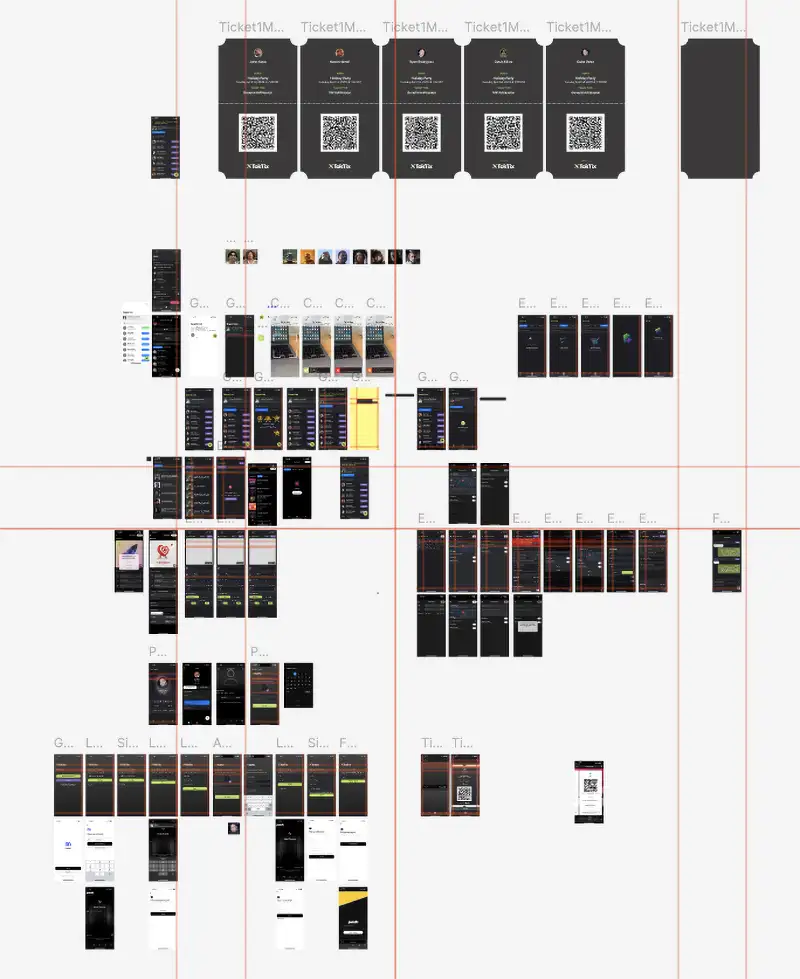
A lot of mobile design via Figma
Service Architecture Design
To prevent the technical debt that typically accumulates in solo projects, I implemented a clean service architecture with clear separation of concerns:
- Event Management Service: Handles event CRUD operations and validation
- Publishing Service: Manages the draft-to-published workflow with error handling
- Image Processing Service: Optimizes and processes event images
- Ticket System Service: Manages multi-tier ticketing and inventory
- Authentication Service: Handles cross-platform user sessions
- Payment Service: Integrates Stripe Connect for promoter payouts
- Event Analytics Service: Real-time sales, scan, and payout reporting for organizers
- Role Management Service: Organization hub with partner, promoter, and scanner roles
This modular approach prevents circular dependencies and enables independent testing and maintenance of each system component.
That early discipline paid off. What began as a handful of services has grown to more than 50 client-side services and 40+ Cloud Function modules covering payments, refunds, SMS, wallet passes, AI extraction, and analytics. That's over 115,000 lines of TypeScript across the app and backend, all covered by an automated end-to-end test suite (Maestro) that runs through auth, event creation, scanning, refunds, and full regression flows.
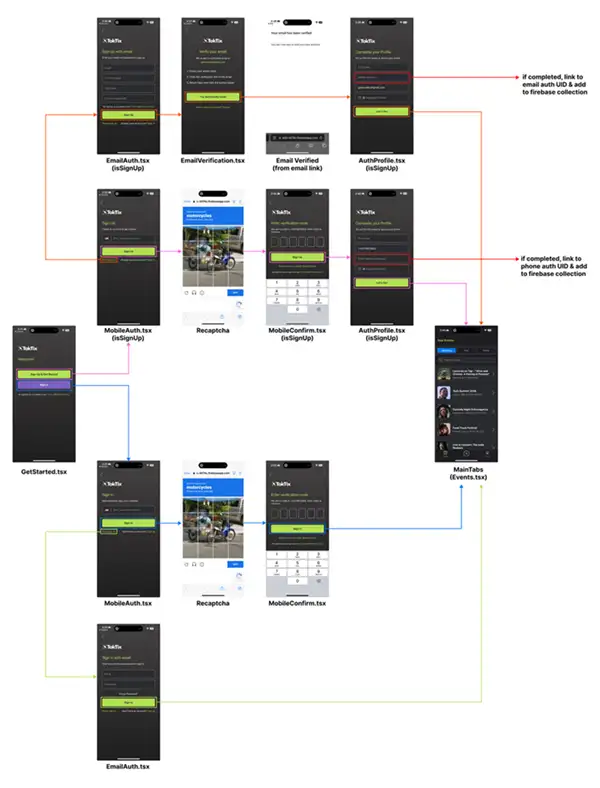
Diagramming the mobile authentication userflow.
Web Architecture
One of the most complex challenges was a web setup that works well for ticket buyers while staying flexible behind the scenes. Event pages originally lived on their own subdomain at events.toktix.com, which meant browser-specific handling for Safari to prevent redirect loops and shared authentication across domains. The platform recently consolidated everything under a single domain:
- toktix.com: Marketing site with contact forms and brand presence
- toktix.com/events: Event-specific landing pages and checkout system
Moving event pages from the subdomain to toktix.com/events simplified authentication, kept all SEO authority on one domain, and removed a whole class of cross-domain redirect issues, while keeping the optimized page generation for SEO performance.
UX Design Philosophy
I adopted a "sleek and simple" design philosophy that prioritizes core user flows over feature abundance:
For Event Promoters:
- Event creation streamlined to under 2 minutes for basic setup
- Draft system allows refinement before publishing
- Multi-tier ticket management without complexity overhead
- Real-time sales tracking with clear analytics
For Ticket Buyers:
- Single-page event discovery with immediate purchase capability
- Checkout process optimized for mobile-first experience
- Clear ticket information without unnecessary steps
- Instant ticket delivery with QR codes for entry
Technical Implementation Highlights
React Native Mobile Development: Built using Expo for rapid development and deployment flexibility. Implemented offline-capable ticket scanning, real-time Firestore listeners for live updates, and custom navigation flows that maintain state across complex user journeys.
Firebase Integration Strategy: Chose Firebase for cost-efficient scaling and built-in real-time capabilities. Wrote strict security rules, optimized Firestore queries for performance, and designed data models that support complex ticketing scenarios without slow queries.
Publishing System with Error Recovery: Built a publishing system that handles image optimization, data validation, and error recovery. The system includes progress tracking, exponential backoff retry logic, and clear user feedback throughout the publishing process.
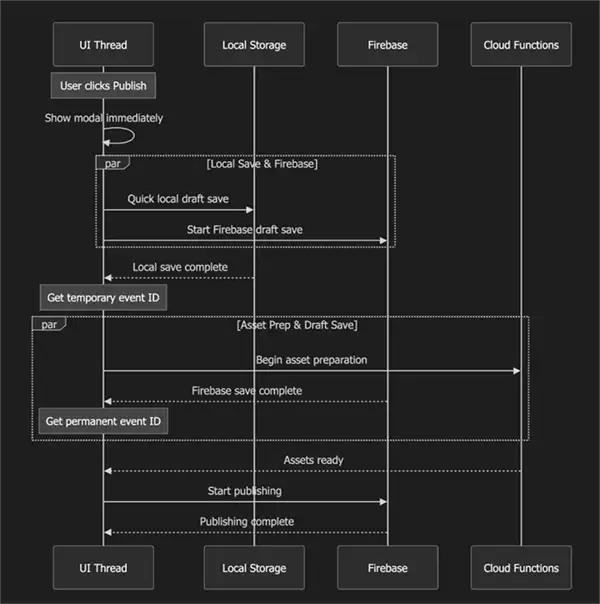
Event publishing workflow with draft system, validation, and error recovery.
Payment Processing Integration: Integrated Stripe Connect to enable direct payouts to event promoters while maintaining platform transaction visibility. Implemented secure webhook handling and error handling for payment failures. Automating the chargeback process is a work in progress, adding dispute tracking and fund recovery directly into the payment flow.
AI-Assisted Development Journey
The development journey became a fascinating exploration of AI-assisted coding tools and workflows, evolving as I learned what worked best for this project:
Claude Projects Era: During this time I ended up using Claude Projects, which became like another Git repo for all my code, so it can understand all the code together. This was my first experience with AI that could maintain context across an entire codebase.

Claude Desktop Project.
Transition to Cline: Then I moved into using the Cline extension on VSCode and just using Anthropic API keys, which gave me more control over the development environment while maintaining the AI assistance.
The Cursor Experiment: Then moved into Cursor, which actually somewhat massacred my frontend at the time. This was a valuable lesson in tool selection and the importance of understanding how different AI coding tools approach code modification.
Back to Cline: Then moving back to Cline using again using the Anthropic API keys using Claude, burning through tokens as I go. But the results were worth it - I now have a React Native application, which creates Next.js landing pages that get made through the app.
Claude Code Era: Moving to Claude Code has been an incredible experience. I've been able to really 10x my entire production and move a whole lot faster than ever before. My workflow has completely changed using GitHub issues as my issue setup as well as having a memory bank backend to support it as far as memory and to utilize MCPs to do things that quite honestly would take so long to accomplish otherwise. That memory bank now lives in an Obsidian vault, so every session starts with real project memory instead of a blank slate.
Claude Code time is here.
Development Workflow and Tooling
My solo development workflow, built up over the course of the project:
- TypeScript throughout for type safety and developer experience
- Markdown documentation for future reference
- Obsidian vault as the project memory bank, organized into active context, solutions, learnings, and architecture docs
- Custom Claude Code skills, slash commands, and specialized subagents that keep the harness properly in check, handling worktree management, PRD creation, testing, and deploys the same way every time
- Service architecture that enables independent testing and maintenance
- AI-assisted code generation with human oversight and validation
- Performance monitoring and optimization tracking
Where It Is Today
What started as a scanning MVP is now a shipping product. TokTix runs as native apps on both iOS and Android (the Android app launched on Google Play in July 2026), backed by the Next.js web platform and Firebase infrastructure. Instead of a loose pool of beta testers, the platform is now in an active pilot with a live event company: real promoters, real doors, real ticket buyers moving through the system at their events.
Running a genuine pilot changed the priorities. Getting a single company all the way through their event lifecycle, from publishing to selling to scanning to getting paid, surfaced exactly what a ticketing platform needs to be trusted with other people's money and other people's guests. That feedback drove the features that shipped next.
Expanding the Platform
With the pilot live, TokTix has grown from a solid ticketing MVP into a full event operations platform. The systems a real business needs to run events at scale, like money handling, team permissions, and marketing, have moved from roadmap to production:
Money & Trust
- Analytics (shipped): Real-time event dashboards with sales timelines, ticket-tier breakdowns, and net payout tracking so promoters can see how an event is performing as it happens.
- Refunds (shipped): First-class refund handling built directly into the ticket and payment flow, with per-ticket refunds processed through Stripe so promoters can make buyers whole without leaving the platform.
- Chargebacks (in development): Automated dispute handling through Stripe that tracks chargebacks in a dedicated ledger and recoups funds, protecting both the platform and the promoters running events on it.
Organizations & Roles
Moving from a single-user app to a multi-company platform meant designing a proper permissions model, so teams, not just individuals, can run events together. All of this is live in production:
- Organizations: Companies get their own workspace, with their events, staff, branding, and their own Stripe payout account grouped under one roof. Owners can even run multiple organizations.
- Company roles: Organization-wide permissions for owners and organizers that control who can create events, view finances, and manage the team, enforced from the UI all the way down to the database security rules.
- Event-based roles: Granular, per-event access for partners, scanners, and promoters so the right people get exactly the access they need for a specific event and nothing more. Door staff can scan, and promoters get link-based attribution and commission tracking without seeing guest data.
Beyond Ticketing
The platform has also shipped features that extend past the core sell-scan-pay loop:
- AI flyer scanning: The OCR prototype from the early days is now a production feature. Snap a photo of an event flyer and AI extracts the date, venue, tiers, and details into a drafted event.
- SMS marketing: A paid subscription tier that gives organizers a dedicated phone number, two-way text inbox, and campaign sending, with opt-out consent, quiet hours, and content compliance built in from day one.
- Wallet passes: Tickets save straight to Apple Wallet and Google Wallet.
- WordPress embeds: An embeddable checkout widget so organizers can sell tickets from their own websites, with sales flowing into their own analytics.
Together, analytics, refunds, and role-based access have turned TokTix from a tool one person uses into infrastructure a whole company can run on.
Results
The platform integrates complex technical requirements while keeping the simplified user experience that sets it apart from competitor platforms. Everything below is live in production today.
Toktix homepage hero AI video
Technical Achievements
What's live in the stack today:
- Cross-platform mobile application with offline capabilities
- Responsive web platform with SEO optimization
- Real-time backend infrastructure with security compliance
- Payment processing integration with automated promoter payouts
- Automated end-to-end test suite covering auth, scanning, refunds, and regression flows
- Production observability with Sentry, Crashlytics, and PostHog session replay
- AI assistance that scaled one developer's capability to team-level output

Layout from the Pitch Deck - ask for access :)
Next Steps
With analytics, refunds, organizations, role-based access, AI flyer scanning, and SMS marketing shipped, current development focuses on chargeback dispute protection, automated promoter payouts, and AI flyer generation (the reverse of the shipped scanning flow) so the platform can expand beyond this first pilot to more event organizations while staying differentiated from competitors like Posh, Luma, and Dice.